
Top Digital Marketing and SEO Services in Kansas City: Your Go-To Agency for Web Design, WordPress, and Custom Solutions
A website template can get a practice online, but it is not a complete plan for serving patients. Templates can be a starting point; the finished site still needs accessible, mobile-first design shaped around how patients find information and take the next step. Lee’s Summit web design for healthcare practices is built on specialized strategies, and for practices serving Kansas City, Overland Park, Olathe, and Leawood, sites should prioritize clear navigation, readable content, and accessible controls from the start.
Accessibility is part of the standard, not an optional extra. According to the U.S. Department of Justice, the Americans with Disabilities Act requires healthcare practice websites to be usable by people with disabilities. WCAG 2.1 Level AA is generally accepted as an accessibility standard for medical organizations.
If you’re weighing a template against a more tailored design, the right choice depends on how well the site supports your patients and your practice. This article explains what mobile-first, accessible healthcare web design involves, how to assess template limitations, and which features help visitors find care information and connect with your practice. You’ll also learn how a website can create a clearer, more useful experience for patients across the Kansas City area.
Key Takeaways
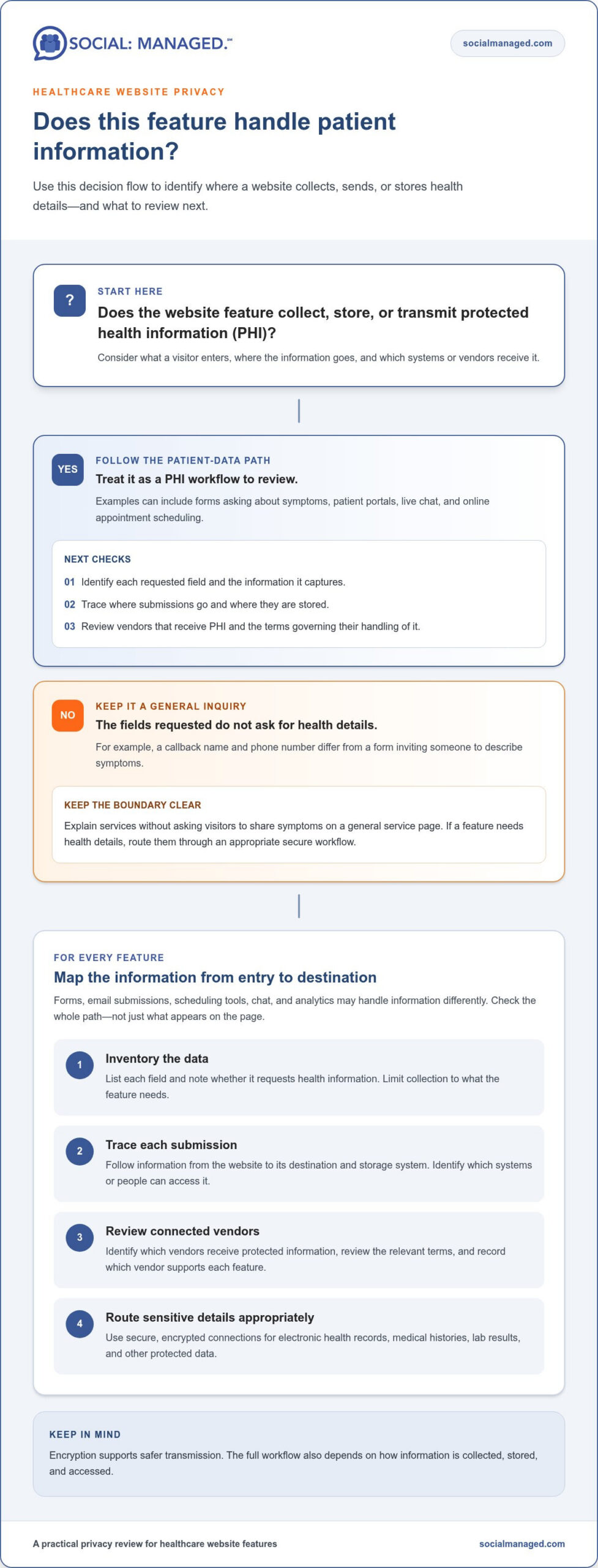
- Review every website feature that collects or sends patient information, including forms, chat, and appointment scheduling, for privacy considerations.
- Organize pages around the needs of each specialty so visitors can find relevant care information without sorting through unrelated content.
- Make key actions easy to spot and understand, helping patients move from learning about a service to taking the next step.
- Use clear, useful content and thoughtful site structure to support both patient discovery and search visibility.
- Consider ongoing search engine optimization when a redesigned site needs to reach more local patients over time.
ADA accessibility and mobile-first design
According to the U.S. Department of Justice, the Americans with Disabilities Act requires healthcare practice websites to be usable by people with disabilities. For practices serving Kansas City, Overland Park, Olathe, and Leawood, that means patients should be able to read information, navigate pages, and use essential features in different ways. WCAG 2.1 Level AA is generally accepted as an accessibility standard for medical organizations. Treat it as a practical design benchmark, not a last-minute technical check.
Start with the content patients need most, such as care details, office information, and appointment steps. Make body text at least 16 pixels so it remains readable on common screens. Keep paragraphs brief, use descriptive headings, and choose strong contrast between text and its background. Links need a 3:1 contrast ratio against surrounding text and a non-color distinction, such as an underline. That helps visitors identify links without relying on color alone.
Controls should be clear and usable by touch. The recommended minimum button size is 24 x 24 CSS pixels, with enough space around buttons to reduce accidental taps. Label each button with an action, such as “Request an appointment,” rather than a vague instruction like “Click here.” Check forms, menus, and appointment links at a narrow screen width. A visitor should be able to identify each control and understand its purpose without zooming or guessing.
Design for mobile first, then adapt the layout for larger screens. More than 60% of web traffic comes from mobile devices, and the majority of healthcare searches happen on phones. A patient looking for a service on a phone should not have to pinch, scroll sideways, or hunt through a crowded menu. Put the key information in a logical order, keep navigation concise, and make important actions easy to reach. A mobile-first layout also helps expose clutter before it becomes harder to fix across desktop pages.
- Check text: Confirm body copy reaches 16 pixels and remains readable against its background.
- Check links: Verify the 3:1 contrast ratio and add an underline or another non-color cue.
- Check controls: Test 24 x 24 CSS pixel minimum buttons and spacing on a phone-sized screen.
- Check navigation: Open menus and follow key tasks using touch, keyboard, and screen magnification.
- Check page flow: Make sure service details and appointment actions appear in a clear mobile sequence.
Test real tasks rather than judging accessibility from appearance alone. Try finding a specialty page, reading its details, and locating the next step. Repeat the process with a keyboard and a mobile device. These checks reveal barriers that a polished screenshot can miss and give designers specific issues to resolve before launch.
Discuss Your Healthcare Website Design with Social: Managed.
HIPAA-safe website design and privacy
HIPAA-aware design starts by identifying where a website handles patient information. HIPAA and the HITECH Act require covered healthcare organizations and their business associates to protect patient privacy and keep protected health information confidential. HIPAA applies to website elements that collect, store, or transmit protected health information. For example, a contact form asking about symptoms may handle sensitive details, unlike a form requesting only a callback name and phone number.
Map each feature before adding it to a practice website. Contact forms, email submissions, patient portals, live chat, and online appointment scheduling can involve protected health information. Visit or care summaries can also contain sensitive details. For every feature, note what information a visitor enters, where it goes, and which systems or vendors receive it. This inventory helps distinguish general inquiries from workflows involving patient data.
Keep the public site and clinical tasks clearly separated. A general service page can explain a specialty without asking visitors to describe symptoms. If a form needs health details, direct that information through an appropriate, secure workflow rather than an ordinary marketing inquiry. Websites handling protected patient data should use secure, encrypted connections for electronic health records, medical histories, lab results, and other protected data. Encryption supports safer transmission, but the full workflow also depends on how information is collected, stored, and accessed.
Review third-party tools before connecting them to patient-facing pages. Appointment scheduling, chat, analytics, and form services may process information differently, so identify what each tool receives. Review the terms governing any vendor that handles protected health information before connecting it to a patient-facing feature. Record which vendor supports each feature and limit data collection to what the feature needs. For example, a scheduling form can ask for a preferred appointment time without inviting a detailed medical history in an open text box.
- Inventory data: List each field and identify whether it requests health information.
- Trace submissions: Follow form entries from the website to their destination and storage system.
- Review integrations: Identify vendors that receive protected information and document the relevant agreement.
- Reduce exposure: Keep general marketing forms focused on contact details, not clinical histories.
- Protect transmission: Use secure, encrypted connections for protected patient data.
These design decisions make privacy part of the site’s structure, rather than a disclaimer added after launch. For a redesign, a website project discussion can map which pages collect information and how each feature fits the patient journey.
For healthcare providers in the United States, collecting, storing, or transmitting patient health information means they must comply with HIPAA. Treat that obligation as part of each website decision, not a final check after launch. Before a feature goes live, confirm whether it handles patient information, where submissions travel, and which systems or vendors can access them. Keep general questions separate from clinical workflows, and revisit the inventory whenever a form, portal, chat, or scheduling feature changes.
Website design for physician practices and specialty clinics
Choose an agency by reviewing its healthcare experience, design process, and ability to explain its decisions. Evaluate agency reviews and healthcare portfolios for clear examples of specialty pages, patient pathways, and practical website outcomes.
Healthcare Website UX and Development
Healthcare website UX covers how patients move from a question to useful information and an appropriate next step. Start with information architecture: group pages by specialty, service, and audience, then map how those pages connect. A wireframe makes this structure visible before visual design begins. For example, a cardiology patient should find relevant care details without sorting through unrelated clinic services.
Review how the design adapts across phone and desktop screens, then assess the development behind forms, menus, and page templates. Usability testing can reveal whether visitors understand labels and complete common tasks. Check that the finished site reflects the approved wireframes and that each specialty page has a clear place in the navigation.
Agency Selection and Healthcare Portfolio
Look beyond attractive screenshots. A useful healthcare portfolio shows how an agency organizes real practice content, presents specialties, and guides visitors through a task. Read reviews for specific details about communication, project decisions, and follow-through rather than relying on star ratings alone. Ask how the team gathers requirements, handles feedback, and measures whether the new structure serves patients.
Medical and dental practices are subject to state board rules governing specialty advertising, testimonials, and claims about outcomes. An agency should understand that content choices affect more than visual polish. Review sample pages for clear, measured language and layouts that give each specialty accurate context. Compare portfolio examples with your practice’s needs, not just their colors or photography.
Redesign Timelines and Costs
A focused healthcare website redesign typically takes 6 to 8 weeks. Scope affects the schedule: content revisions, page count, integrations, and feedback rounds shape the work. Set a clear review process and assign someone to approve clinical details promptly. That keeps wireframes, design, development, and launch tasks moving in sequence.
Project pricing depends on the scope and is provided after a quote request. Key cost factors include the number of page templates, content migration, custom functionality, and connections to scheduling or patient systems. A redesign using existing content differs from one requiring new specialty copy and a reworked site structure. Define priorities early so the proposal reflects the work involved.
After launch, use analytics, heatmaps, and user testing to find friction points. For example, if visitors leave a service page before reaching its appointment information, review the content order and calls to action. Competitor audits can also highlight gaps in how nearby practices explain services. Turn these findings into a prioritized optimization roadmap, then revisit changes as patient needs and site content evolve.
Intuitive navigation and calls to action
Patients often visit a practice website with one immediate task: find a specialty, understand a service, or request an appointment. Build navigation around those needs rather than internal department names. For example, a patient seeking dermatology care should recognize the “Dermatology” menu label without knowing the clinic’s organizational structure. Clear labels reduce guesswork and help visitors choose a useful next step.
Keep the main menu focused on core destinations, such as “Services,” “Providers,” “Patient Information,” and “Contact.” Put related pages under a logical parent instead of listing every specialty at the same level. A Lee’s Summit clinic with several locations can make location details easy to find without burying service information. Use consistent labels across the menu, page headings, and buttons so visitors know when they’ve reached the right destination.
Calls to action should match the page’s purpose. A provider profile might invite visitors to learn about that clinician’s services, while an appointment page can present the scheduling action directly. Avoid making every button say “Submit” or “Learn More.” Specific text such as “Request an appointment” tells visitors what happens next. Place the primary action near relevant information, then repeat it where a long page naturally reaches a decision point.
- Map common tasks: List what a visitor needs to do on the home page, service pages, and provider profiles.
- Use familiar labels: Choose terms like “Services” instead of unexplained internal abbreviations.
- Prioritize one action: Make the main next step visually distinct from secondary links.
- Set expectations: Explain whether a button opens a scheduling page, phone option, or inquiry form.
- Test the path: Follow a task from the home page to its destination on desktop and mobile.
Navigation should support different visitor intentions without forcing everyone through the same route. A new patient may need provider credentials and information about services, while an existing patient may want a portal or office phone number. Give these audiences clear entry points. Keep important destinations available from relevant pages, so visitors don’t need to return to the home page to continue.
Use page structure to guide attention. A service page can move from a concise explanation to care details, provider information, and a next step. For a specialty clinic, links between related services and clinicians help visitors explore without restarting their search. Avoid giving competing buttons identical visual weight. A clear primary action and a quieter secondary option are easier to scan.
Review navigation using actual tasks, not just a design preview. Ask someone unfamiliar with the practice to find a provider, locate a specific service, and identify how to contact the office. Note where they pause or choose the wrong link, then adjust the wording or placement. These checks turn confusing paths into specific design fixes and make the site easier to use.
Healthcare website design services and features for medical practices
A medical practice website needs more than an attractive home page. Its pages should explain care clearly, support patient tasks, and help visitors find relevant information. For a Lee’s Summit clinic, start by matching each feature to a real visitor need, such as comparing services or finding care details. This keeps the design purposeful and prevents decorative features from crowding out useful content.
Readable content design gives patients room to absorb important details. Set paragraph line height around 1.5-1.6, then break dense explanations into short sections with descriptive headings. A specialty page, for example, can introduce a service, outline what it involves, and direct visitors to related provider information. Use conversational wording that reflects how people ask questions, rather than relying only on clinical terminology.
Voice search is another reason to write naturally. Structure answers around the questions patients might say aloud, then use specialized schema markup to support voice search results. Schema helps describe page content in a structured way. It does not replace clear writing: a page about pediatric care still needs direct explanations, accurate details, and headings that make its subject obvious to visitors.
Large practices and clinics with extensive content can add a search tool to their site. Suggestions help visitors refine a query as they type, while filters can separate results by specialty or content type. Relevant results matter most. A patient searching for a particular service should see the matching page before unrelated news or general resources.
- Service pages: Explain each specialty with focused, patient-friendly information.
- Search: Add suggestions, filters, and relevant results when site content becomes extensive.
- Structured content: Use conversational questions and specialized schema markup for voice search support.
- Resource library: Publish evergreen healthy-living resources and update case studies when details change.
Plan for content that remains useful after launch. A practice can combine service pages with research, updated case studies, and evergreen healthy-living resources. Assign an owner to review dated details and refresh pages when services or information change. This creates a more reliable library than a site built around one content format or a single launch campaign.
Visual choices also shape the experience. Avoid aggressive shades of red as the primary color, since they can create a sense of urgency or alarm. Overly dark themes are generally better suited to business-to-business healthcare technology than patient-facing practice sites. Choose a clear visual hierarchy, then check how service pages, resource content, and search results work together.
Use a post-launch roadmap to improve specific pages. Analytics can show which content visitors reach, heatmaps can reveal where they interact, and user testing can expose confusing elements. Combine those findings with a content review, then prioritize changes such as clarifying a service explanation or improving search results.
Social: Managed: Search Engine Optimization
Social: Managed provides Search Engine Optimization to help healthcare practices strengthen how their websites appear in relevant searches. Turn to SEO when a well-designed site needs clearer content structure, locally relevant service pages, or ongoing attention to search visibility. For example, a Lee’s Summit clinic can organize pages around its specialties and patients’ questions, making key information easier to find. SEO works alongside useful, accurate website content; it does not replace a clear patient experience or privacy-conscious design. Social: Managed can also support related digital marketing through Social Media Management, Digital Marketing, and Facebook Ads when those channels fit the practice’s goals.
Contact Social: Managed to discuss your practice’s next step, or visit socialmanaged.com.
Build a stronger next step for your practice
Your next move can be a focused review of the website patients use today. Choose one priority, such as improving a key service page or clarifying how visitors reach the right next step. Then align the site’s ongoing updates with your practice’s goals rather than treating launch as the finish line. A deliberate plan keeps future decisions connected to patient needs and the practice’s direction.
For practices refining Lee’s Summit web design for healthcare practices, Social: Managed offers Search Engine Optimization, Social Media Management, and Digital Marketing. These services can support efforts to strengthen a website’s visibility and keep its digital presence aligned with changing priorities. Start with the challenge that matters most to your team, then build from there.A clear, considered next step can help your practice move forward with confidence.
Frequently Asked Questions
How Does a Healthcare Website Drive Patient Acquisition?
A healthcare website can help prospective patients move from researching care to contacting a practice. A visitor comparing providers, for example, can review relevant services, understand what the practice offers, and find a clear way to reach the office. Useful content also gives search engines context about specialties and locations. Track meaningful actions, such as calls or appointment inquiries, to see which pages help visitors take the next step.
What Makes Healthcare Website Design Different From Other Industries?
Healthcare websites must present sensitive and sometimes complex information with care. Patients may need to understand a specialty, compare care options, or find practical details before contacting a practice. That calls for accurate, clearly organized content and a thoughtful path between information and action. Medical and dental practices also need to consider state board rules around specialty advertising, testimonials, and claims about outcomes when reviewing website copy.

Ready to get started? Reach out to Social: Managed. online, or call us at 866-324-9700. We manage your company’s social life so you can have one! You don’t need complicated packages. We listen to your goals.
Then we design and manage SEO, social media, ads, websites, and email campaigns built to deliver results. No jargon. No guesswork. Just real growth from a team that cares. Ready to get rolling? Follow Social: Managed. on Facebook for a peek into our social life.