
Top Digital Marketing and SEO Services in Kansas City: Your Go-To Agency for Web Design, WordPress, and Custom Solutions
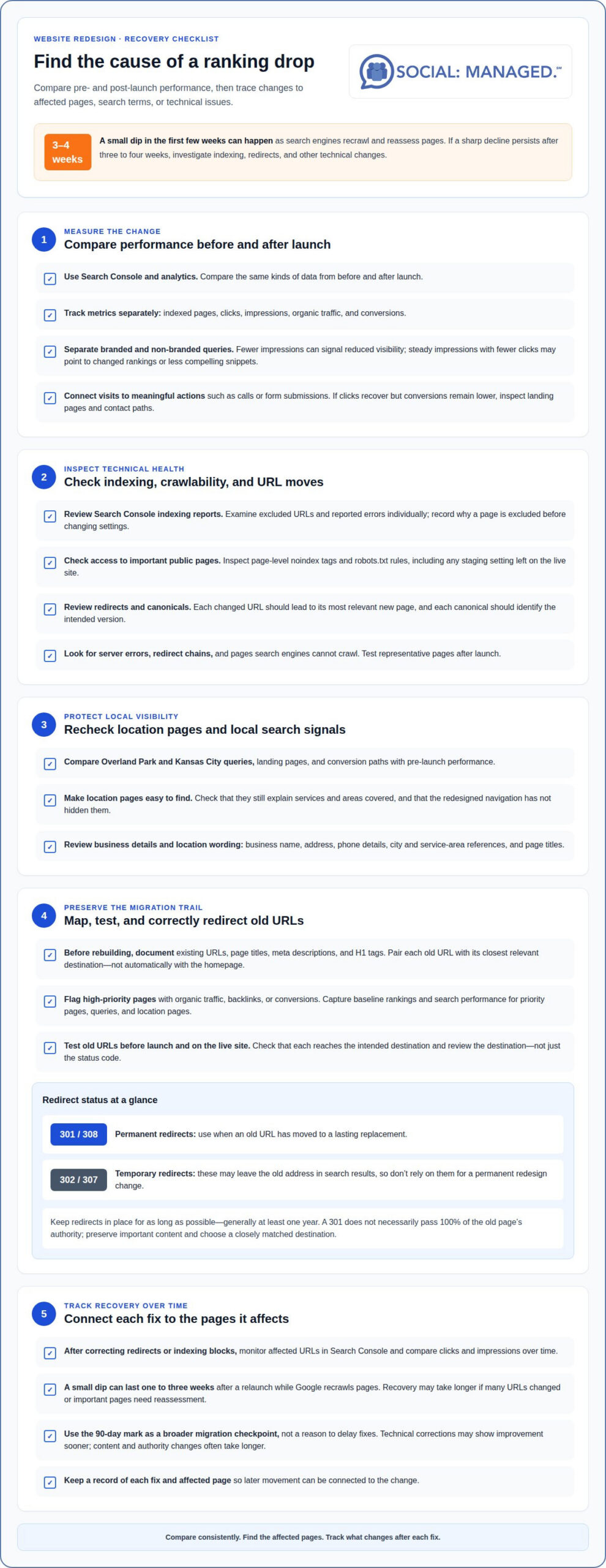
A ranking drop after a redesign doesn’t always mean the new site is failing. A small traffic dip in the first few weeks can happen as search engines crawl and reassess updated pages. A sharp decline that persists deserves a closer look.
It’s understandable to worry when traffic or leads fall after launch. A clear process for fixing website ranking drops after a redesign in Overland Park starts by comparing pre- and post-launch performance, then tracing the decline to specific pages, search terms, or technical issues.
This guide shows you how to use Search Console and analytics to identify meaningful changes, review redirects and indexing, and trace what changed on your site. You’ll also learn to distinguish a temporary fluctuation from a problem that needs action, so you can prioritize fixes that may restore visibility.
Key Takeaways
- A brief traffic dip can happen after launch; ongoing declines call for a closer look at indexing, clicks, impressions, and conversions.
- A redirect map and a baseline of important pages help preserve search visibility when URLs or page content change.
- Comparing Search Console and GA4 data before and after launch can reveal whether the decline affects search visibility, site traffic, or both.
- Technical issues such as blocked crawling, incorrect canonicals, or redirect errors can undermine a redesigned site’s rankings.
- Review changes made before and after launch to connect ranking losses with specific updates to site structure, content, or tracking.
Will my website’s traffic drop after a website redesign?
A small traffic dip in the first few weeks after launch can happen as search engines recrawl and reassess pages. If a sharp decline persists after three to four weeks, investigate indexing, redirects, and other technical changes rather than assuming rankings will recover on their own.
For visibility in Overland Park and Kansas City, review local search queries, location-specific landing pages, and consistent business details. Compare them before and after launch to see whether local discovery changed along with overall traffic.
-
Monitor Search and Conversion Metrics
Compare Search Console and analytics data from before and after launch. Track indexed pages, clicks, impressions, organic traffic, and conversions separately. Fewer impressions can indicate reduced visibility, while steady impressions but fewer clicks may point to changed rankings or less compelling search snippets.
Review branded and non-branded queries separately, then connect organic visits to meaningful actions such as calls or form submissions. If clicks recover but conversions remain lower, inspect the affected landing pages and contact paths instead of treating traffic alone as success.
-
Inspect Indexing and Crawlability Issues
Open Search Console’s indexing reports and examine excluded URLs and reported errors individually. Confirm that important public pages are accessible, then check page-level
noindextags androbots.txtrules. A staging setting left on the live site can block indexing, so test representative pages after launch.Next, review redirects and canonical tags. Each changed URL should lead to its most relevant new page, and each canonical should identify the intended version. Check for server errors, redirect chains, and pages search engines cannot crawl. Record why a page is excluded before changing settings.
-
Check Local SEO Signals
Compare Overland Park and Kansas City queries, landing pages, and conversion paths with their pre-launch performance. Confirm that location pages still explain the services and areas they cover, and that navigation makes them easy to find. A redesigned menu can hide local pages even when their URLs haven’t changed.
Review the business name, address, and phone details wherever they appear on the site. Keep city and service-area wording aligned across pages, including the Overland Park local market page. Look for removed location references or changed page titles that could weaken relevance for local searches.
-
Estimate Recovery After Fixes
After fixing redirects or indexing blocks, monitor affected URLs in Search Console and compare clicks and impressions over time. A small dip can last one to three weeks after a relaunch while Google recrawls pages. Recovery may take longer if many URLs changed or important pages need reassessment.
Use the 90-day mark as a broader checkpoint for migration recovery, not as a reason to delay fixes. Technical corrections may show improvement sooner after search engines process them, while content and authority changes often take longer. Track each fix and its affected pages to connect later movement with the change.
Are Your Rankings Dropping? Contact Social: Managed.
Rankings Dropped After Your Website Redesign?
Protect valuable search visibility by preparing a URL map and ranking baseline before migration. These records make it easier to measure changes and identify redirects that need attention after launch.
-
Prepare Redirect Maps and Ranking Baselines
Before rebuilding, document existing URLs, page titles, meta descriptions, and H1 tags. Pair each old URL with its closest relevant destination, rather than sending every retired page to the homepage. Mark pages with organic traffic, backlinks, or conversions for extra care. This map becomes the migration plan and gives the team a clear record of what should remain available, move, or no longer exist.
Capture baseline rankings and search performance for priority pages and queries, including branded and non-branded searches and important location pages. Record the date range and landing page for each measure so post-launch comparisons use the same basis. A shift from position three to six differs from a broader decline in impressions and clicks.
-
Test Old URLs and Redirect Statuses
Test a sample of old URLs before launch, then test the full map on the live site. Confirm that each address reaches its intended destination and returns the planned status. Check key service and location pages, along with URLs that have strong backlinks or conversions. A redirect to an unrelated page can confuse visitors and search engines, even if the old address technically resolves.
Review the destination, not just the status code. A missing page should lead to the closest relevant replacement. If none exists, don’t redirect it to an unrelated page. Document URLs that return errors or no longer serve a purpose. This helps distinguish expected removals from overlooked redirects during post-launch checks.
-
Apply Permanent Redirects
Use a permanent 301 redirect when an old URL has moved to a lasting replacement. Google also recognizes 308 redirects as permanent, while 302 and 307 redirects are temporary and may leave the old address in search results. Don’t rely on temporary codes for a permanent redesign change. Test the live response after the update, since a rule in a spreadsheet doesn’t prove the site applied it correctly.
Keep redirects in place for as long as possible, generally at least one year. A 301 doesn’t necessarily pass 100% of the old page’s authority, so preserve important content and choose a closely matched destination. Redirects help search engines understand a move, but they can’t fully replace a page that served a distinct purpose.
-
Prevent Redirect Chains and Canonical Conflicts
Send each old URL directly to its final destination. For example, avoid a route from an old page to an interim URL, then onward to the new page. Redirect chains add hops and can make migration signals less clear. If a direct redirect isn’t possible, keep the route to no more than 3 hops, and remove unnecessary steps when updating the site.
Compare each destination’s canonical declaration with the redirect map. The canonical should identify the intended final page, not an outdated URL or a different page. Test redirected URLs and destination pages together after launch. When redirects and canonicals disagree, search engines receive conflicting signals about which address should appear in results.
If the redirect map or live responses are difficult to interpret, discuss the migration with the team before making further changes.
Compare Pre/Post-Launch with Search Console and GA4
Use consistent date ranges and page groups to compare search visibility with visits and business outcomes. For teams fixing website ranking drops after a redesign in Overland Park, separating domain-move effects from tracking, content, and demand changes helps focus the investigation.
1. Set matching comparison periods in Google Search Console and GA4, then segment results by landing page and channel. In Search Console, compare clicks, impressions, and average position for old and new URLs. In GA4, compare organic sessions and conversions for corresponding landing pages. Fewer Search Console clicks may signal a visibility change, while steady clicks but fewer GA4 sessions can point to analytics or landing-page behavior. Record the launch date and annotate major updates. Compare branded and non-branded queries separately, and use year-over-year data when seasonality may affect demand. Keep filters consistent so changed date ranges or channel definitions don’t distort your comparisons.
2. For a domain change, verify both properties in Search Console and submit the Change of Address request after the move. Google displays a move-in-progress notice in both properties for 180 days after submission. Check whether important URLs on the new domain receive impressions and clicks, and whether old URLs reach their mapped destinations. Don’t treat the notice as proof that every page moved correctly. Compare old and new URLs individually, then review indexing reports for the new property. A medium-sized site can take a few weeks or more to settle after a domain move, so assess page-level trends alongside migration status.
3. Crawl the live domain and compare the findings with Search Console. Review crawlable URLs, response codes, canonical declarations, internal links, and page titles. Then inspect representative pages in a browser, including their rendered content. A crawler may find a URL, while a rendered-page check can reveal missing text or links that depend on JavaScript.Compare the submitted sitemap with the intended public URL inventory. Investigate important pages that are missing, excluded, or returning errors. If clicks fall across a group of URLs, check whether they share a template or crawl issue before treating each decline separately.
4. Review search intent before rewriting pages with declining visibility. Match queries losing clicks to their landing pages, then compare each page’s purpose, main content, and navigation with the searches it should serve. A redesigned service page may lose relevance if it drops useful details or makes the next step harder to find. Use Search Console query and page reports to pinpoint the gap, then assess the live page against that intent. A fictional migration example showed clicks falling 40% in the second week, illustrating why one short period shouldn’t drive a broad rewrite. A careful comparison supports fixing website ranking drops after a redesign in Overland Park with changes tied to specific URLs and evidence.
Common causes of ranking drops after a redesign
Changing URLs, site structure, or content can break relevance and make important pages harder to find. Core Web Vitals and mobile usability also matter: Google added Core Web Vitals as a page experience signal in mid-2021, and poor mobile experiences can hinder visitors.
-
Review URL and Site Structure Changes
Compare the new site structure with the old one, focusing on pages that previously earned organic traffic. Flatter navigation may remove helpful links to service pages, while renamed categories can weaken the connection between a page and its topic. Check that important pages remain reachable through relevant menus and internal links.
Next, compare the live sitemap with the intended public URL inventory. Look for missing pages, unexpected exclusions, and duplicate routes. Review canonical declarations alongside URL changes: a canonical pointing to a different page can tell search engines to prefer that page. Assess each affected URL before changing sitewide rules.
For example, if a service page still exists but no longer appears in navigation or the sitemap, its visibility may decline. Check its links, canonical, and indexing status before assuming the content caused the traffic drop.
-
Check Content Changes
Compare old and redesigned pages to identify removed details, changed headings, or a shift in page purpose. A page that once answered a specific service query may become less relevant if useful explanations are replaced with brief promotional copy. Evaluate the affected query and landing page together instead of rewriting every page after a decline.
Review title tags, H1 headings, visible copy, and structured data where the previous site used it. Confirm that important information remains present in rendered content, especially when the new design relies on JavaScript. A page can look complete in the editor but show less content to search engines if rendering fails.
Also compare internal links and calls to action. If a local service page loses its Overland Park references or links to related services, it may serve visitors and search queries less effectively. Restore missing details only when they accurately reflect the page’s purpose.
-
Review Core Web Vitals and Mobile Usability
Test representative pages on mobile and desktop, including service pages, forms, and navigation. Check that text is readable, buttons work, and key content appears without excessive delay. A redesign can introduce large images, shifting page elements, or scripts that slow loading and disrupt interactions.
Use Core Web Vitals reports to identify affected page groups, then compare those results with organic performance. A poor page experience can contribute to ranking pressure, but it doesn’t explain every traffic drop. Check technical access, relevance, and indexing alongside page experience before choosing a fix.
Finally, test the full mobile journey. Confirm visitors can reach a service page, understand the offer, and use its contact options. A design change that hides navigation or breaks a form can reduce conversions even when organic clicks remain steady.
Reviewing recent website changes after a redesign
Trace ranking changes to specific updates instead of changing several parts of the site at once. Start with a timeline, then restore only missing elements that supported the affected pages.
-
Audit Recent Website Changes
Build a timeline of visible and behind-the-scenes changes made in the 30 to 60 days before the decline. Include design releases, platform updates, content edits, navigation changes, analytics code, and indexing settings. Match each change to the affected URLs and the date their impressions or clicks began falling.
Compare the submitted sitemap with the intended public URL inventory. Note missing pages, unexpected additions, and URLs pointing to the wrong destination. Then inspect representative live pages to confirm the intended update reached production, including its content, links, and indexing directives.
Review changes as connected sets. For example, a new template might alter headings, internal links, and canonical tags together. If those pages lost visibility after the template change, assess the shared technical change before rewriting each page separately.
Keep a record of what changed and what you corrected. This gives later performance comparisons context and helps prevent reversing a useful update while addressing an unrelated issue.
-
Restore Page Content and On-Page Elements
Compare an affected page with its previous version, then restore missing information that still fits the page’s purpose. Check the title tag, meta description, headings, main copy, structured data, and internal links. Don’t copy outdated text blindly. Keep useful details while making the current page accurate and clear.
Use the page’s search queries to guide restoration. If a service page previously answered a specific customer need, make sure its new copy still addresses it. Restore descriptive headings and links to relevant supporting pages where the redesign removed them. Don’t send every missing page to the homepage, which may not satisfy the original query.
Check the rendered page after updates, not just the content editor. Confirm headings and copy appear, internal links work, and key navigation paths remain available. Compare the updated page’s canonical and indexing directives with its intended search address.
Make one focused set of corrections, then track the affected URLs in Search Console. Watch for renewed indexing and changes in impressions and clicks before making another broad edit. This measured approach helps distinguish content recovery from a separate technical issue.
Search Engine Optimization with Social: Managed.
Social: Managed. can help when a ranking drop persists after you’ve reviewed launch changes, indexing, and redirects. Our Search Engine Optimization work connects technical findings with page content and search performance, helping you prioritize next steps instead of making broad changes without a clear reason.
If your redesign is still underway, our Website Design service keeps search considerations in view as pages and site structure evolve. Share the affected pages and performance patterns so we can focus our review on your site’s needs.
Build a Clear Path to Search Recovery
Use each ranking change to guide your next decision. Once technical issues are addressed, keep improving the pages that matter to customers and monitor whether those changes support meaningful visits and inquiries. A measured approach to fixing website ranking drops after a redesign in Overland Park helps you avoid rushed edits and focus on lasting visibility.
A coordinated approach to Search Engine Optimization, Social Media Management, and Digital Marketing can support consistent online visibility. If the cause of the decline remains unclear or recovery stalls, a focused review can turn scattered data into practical next steps. Move forward with a clear plan and purposeful improvements.
Contact Social: Managed. Let’s Discuss Your Website’s Rankings
Frequently Asked Questions
Can a Google Update Cause My Website to Lose Rankings?
Yes, a Google update can affect a website’s rankings, but timing alone doesn’t prove it caused the decline. Compare affected pages with those that stayed stable, and check whether losses cluster around similar topics or templates. If only one redesigned page fell, investigate its changes first. If visibility shifted across unrelated pages at the same time, broaden the review beyond the redesign.
Can Bad Content Cause Ranking Losses?
Yes. Inaccurate, thin, outdated, or poorly matched content can make a page less useful. For example, an Overland Park service page may mention the city but leave out what the service involves or whom it helps. Improve that specific page by answering those questions clearly. Avoid adding location phrases without meaningful information for local customers.
How Long Does It Take to Recover Lost Rankings?
Recovery time depends on what caused the decline and how broadly the site changed. Search engines must process technical corrections, while revised content and authority signals can take longer to reassess. A migration recovery review at the 90-day mark can help show the broader trend, but it isn’t a promised recovery date. Track affected pages and query patterns as changes settle.
Is the Drop Normal, or Is Something Broken?
A modest dip in the first few weeks after launch can reflect search engines recrawling the site. A sharp decline that hasn’t recovered after three to four weeks calls for investigation. Look for a pattern: one broken page points to a page-specific issue, while a broad decline across unrelated URLs may indicate a shared technical or measurement problem.
What Should I Check First When Organic Traffic Drops?
First, confirm that analytics still records visits correctly. A missing tracking tag can make traffic appear to vanish even when search visits continue. Then compare Search Console clicks with GA4 organic sessions for the same pages and period. If both decline, investigate search visibility. If Search Console remains steady but GA4 changes, examine tracking setup and channel attribution before editing page content.
Why Did My Rankings Drop Suddenly?
A sudden drop can follow a live-site release that changes page access, URL destinations, or index settings. It can also coincide with a Google update or shifts in search demand. Identify the affected URLs and when they first lost visibility, then compare those pages with the deployment timeline. This helps distinguish a launch-related fault from a broader search change.
What Causes Organic Search Rankings to Drop After a Website Redesign?
Common causes include changed URLs without suitable destinations, pages removed from navigation, altered content, or blocked access to important pages. A redesign can also change how a page renders, leaving key information unavailable. For example, a service page may still load but lose its core description. Visitors can see it, yet it no longer serves the same search need.
How Can I Diagnose Ranking and Traffic Losses After a Website Redesign?
Separate the symptoms before choosing a fix. Search Console shows whether clicks and impressions changed; GA4 helps show what happened after visitors arrived. Compare affected landing pages with stable ones, then group losses by template, topic, or location. For Kansas City, Overland Park, Olathe, and Leawood pages, check whether the change affected one local area or the broader site.

Ready to get started? Reach out to Social: Managed. online, or call us at 866-324-9700. We manage your company’s social life so you can have one! You don’t need complicated packages. We listen to your goals.
Then we design and manage SEO, social media, ads, websites, and email campaigns built to deliver results. No jargon. No guesswork. Just real growth from a team that cares. Ready to get rolling? Follow Social: Managed. on Facebook for a peek into our social life.